 Nex
NexPRACTITIONER ARTICLE / Security
CISA SCuBA: An Independent Assessment of Your Microsoft 365 Security Configuration
Use CISA’s published baselines and ScubaGear to check Microsoft 365 configurations, distinguish failed controls from incomplete coverage, and prioritize remediation. Includes anonymized September 2026 assessment examples.
By Phil Kinsley
Assessment examples: September 2026. Published and technically reviewed October 13, 2026.
CISA source publication: not confirmed
Source reviewed October 13, 2026. Practitioner analysis is editorial interpretation.
Microsoft 365 environments rarely stay configured exactly as they were when first deployed. New services are introduced, policies change, and exceptions accumulate. An organization might have Conditional Access in place while still permitting legacy authentication for a subset of users, or have email protection policies that are enabled but do not consistently cover the intended accounts.
These are the sorts of differences that can be difficult to spot when teams review each product individually. CISA’s Secure Cloud Business Applications (SCuBA) initiative provides a separate reference point: documented security requirements for cloud services and a tool that tests supported Microsoft 365 settings against those requirements.
What is SCuBA?
The Cybersecurity and Infrastructure Security Agency developed the Secure Cloud Business Applications initiative to help federal agencies strengthen cloud configuration. CISA publishes Microsoft 365 secure configuration baselines and an open-source PowerShell assessment tool, ScubaGear. The baselines can also be useful to commercial organizations that want a publicly documented benchmark beyond the product vendor’s own guidance.
ScubaGear collects tenant configuration data through Microsoft service interfaces and evaluates supported controls using policy logic. The resulting HTML and structured reports distinguish passing requirements, failures, warnings, and checks that need manual review. A passing result means the tool observed the configuration required by that particular check; it is not a certification of the organization’s overall security posture.
Supporting reference: CISA ScubaGear official documentation ↗
What the assessment covers
Some baseline statements cannot be assessed reliably through an API and remain manual checks. Coverage also varies with the installed release, licensing, permissions and services present in the tenant. A service missing from the output must not be interpreted as passing.
Supporting reference: CISA ScubaGear official documentation ↗
| Microsoft 365 service | Configuration areas examined |
|---|---|
| Microsoft Entra ID | Authentication, Conditional Access, privileged access and related identity settings |
| Exchange Online | Mailbox and Exchange configuration requirements |
| Microsoft 365 Defender | Relevant email protection and security policy configurations |
| SharePoint Online | Sharing and collaboration controls |
| Microsoft Teams | Meeting, messaging and external access configurations |
| Power Platform | Environment governance and administrative security |
| Power BI | Supported tenant and sharing controls, where available |
Why run the assessment?
SCuBA is particularly useful before a Microsoft 365 security improvement project, following a migration or tenant consolidation, or when an organization wants evidence of how its environment compares with a published configuration standard. It is also useful as a periodic review when administrators have inherited policies and exceptions established years earlier.
For example, an organization may believe that phishing-resistant authentication is enforced for administrators because those administrators have registered passkeys. Registration and enforcement are not the same thing. The assessment can identify relevant policy requirements that merit closer examination, while the team verifies exceptions, licensing, and the real sign-in experience.
SCuBA complements Microsoft’s Zero Trust Assessment but should not be treated as interchangeable with it. The tools have overlapping areas of interest but apply different checks and criteria.
What the report actually shows
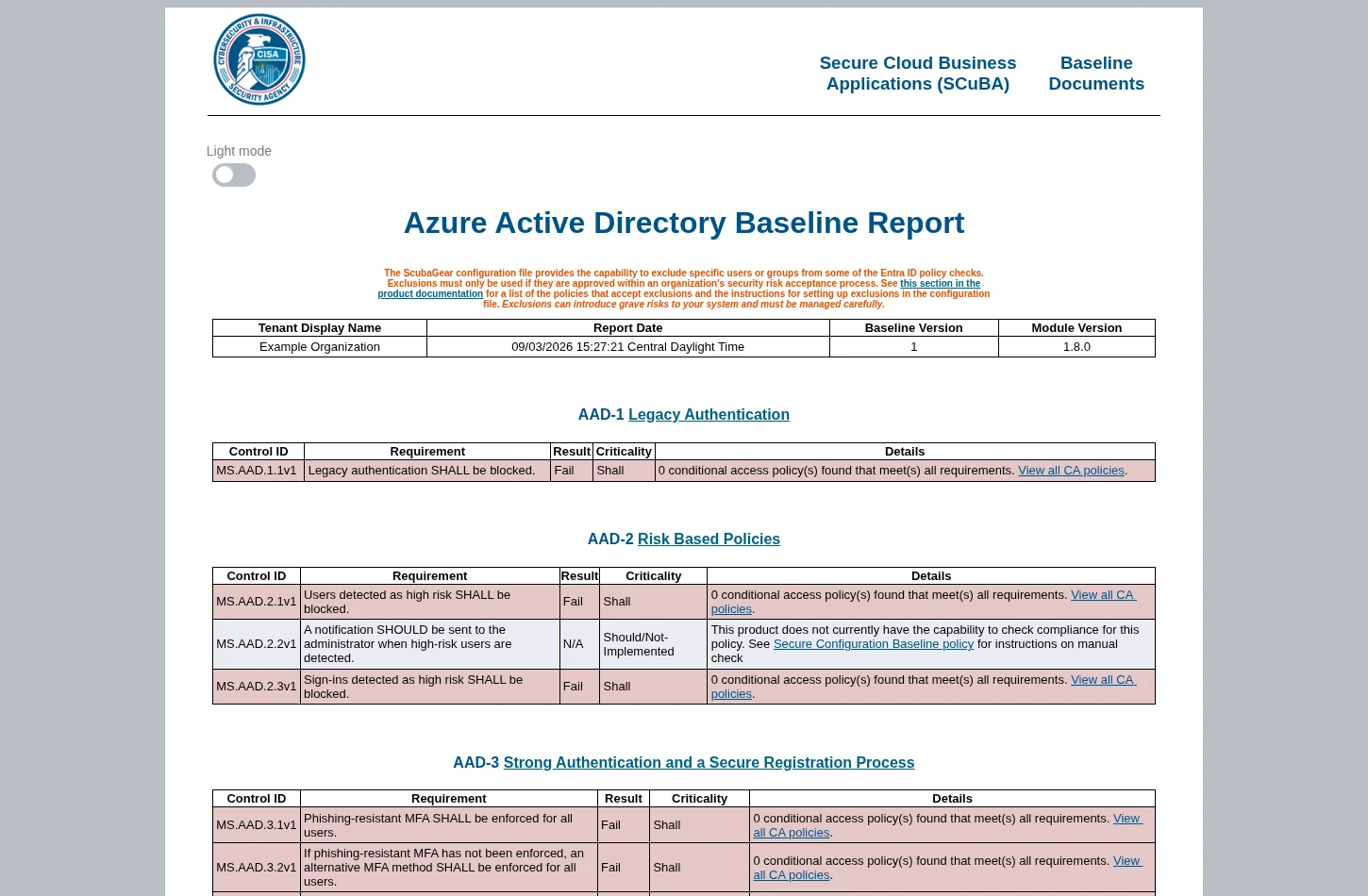
The summary report provides service-by-service totals. In the anonymized real-world example below, several areas have a mixture of passes, warnings, failures and manual checks. That mix is more useful than a single headline score because it shows where further investigation is needed and where automation cannot answer the question.
The Entra ID report identifies requirements individually. A failure in a legacy authentication or risk-based access check means the assessed policies did not satisfy that test’s conditions; it does not, by itself, tell you whether a proposed policy change can safely be applied immediately.
Supporting reference: ScubaGear reports and structured outputs ↗

Prerequisites and planning
ScubaGear requires a supported Windows environment and Windows PowerShell 5.1, along with compatible Microsoft administration modules and Open Policy Agent. Administrators should use the dependency instructions published for their installed release rather than assuming the latest version of every Graph or Exchange component will work.
Access is service-dependent. Read-only roles such as Global Reader can support many checks, but SharePoint, Teams, Exchange, Power Platform and Power BI may need their own administrative roles, permissions or consent. Confirm these against CISA’s interactive authentication documentation before scheduling the run. Prepare the necessary role activations and review the authentication and Conditional Access experience in advance.
CISA documents additional configuration for sovereign cloud environments. GCC High should be treated as its own validation scenario: cloud endpoints, authentication, availability of APIs and product support can differ from commercial tenants.
The collected reports contain sensitive information about policies and possible weaknesses. Store them with access controls appropriate for security assessment evidence, and sanitize names, domains, account identifiers and GUIDs before using screenshots publicly.
Supporting reference: ScubaGear interactive permissions ↗
Supporting reference: ScubaGear dependencies ↗
Running ScubaGear
The following commands illustrate a typical interactive assessment. Verify command syntax and supported dependencies against the release you are installing.
Install-Module -Name ScubaGearInstall-ScubaDependenciesInvoke-SCuBA -VersionInvoke-SCuBA -ProductNames *To limit the scope to selected products:
Invoke-SCuBA -ProductNames aad,exoReview the generated summary and each expected service report. Record any failed connections, missing product output, unsupported controls or manual checks before using the findings to make remediation decisions. CISA also provides structured outputs for tracking action items and comparing repeat runs.
Supporting reference: CISA ScubaGear official documentation ↗
Known limitations to check before you start
Passkeys through Windows Authentication
During my September 2026 ScubaGear 1.8.0 assessment, I had difficulty signing in with a passkey through Windows Authentication and had to use another permitted authentication method to complete the work. I have not confirmed that this precise behavior is a formally documented CISA defect or that it affects all passkey configurations. Teams that depend on Windows Hello or passkey-based sign-in should test their interactive authentication workflow before the scheduled assessment and have an approved alternative ready.
Microsoft authentication modules and WAM
CISA’s troubleshooting guidance documents Microsoft Graph authentication and module compatibility problems. Its issue tracker also contains reports involving Web Account Manager (WAM), including sovereign-cloud sign-in failures. These reports are specific to their versions and environments. Newer module versions may not be compatible with older ScubaGear releases, and the configuration editor can have different authentication requirements from interactive command-line execution. Follow the guidance for the release and execution method you use.
Supporting reference: ScubaGear Microsoft Graph troubleshooting ↗
Supporting reference: ScubaGear issue #1923: authentication failures in GCC High ↗
Missing Exchange or Defender results
CISA’s issue tracker includes reports of Exchange Online and Defender authentication failures with ScubaGear 1.8.0, including issues #2146 and #2156. These are historical reports from particular installations, not evidence that every current release has the same problem. A run may produce other service reports while these are absent. Confirm that every intended product was evaluated; incomplete reports do not demonstrate conformance for missing products.
Supporting reference: ScubaGear issue #2146: Defender and Exchange authentication failures in version 1.8.0 ↗
Supporting reference: ScubaGear issue #2156: version 1.8.0 authentication failures in GCC High ↗
Manual checks, exclusions and government cloud support
Some baseline controls require manual interpretation. Conditional Access policy exclusions may be operationally justified yet still lead to failed checks. Separately, GCC and GCC High can introduce authentication or service compatibility considerations. These conditions need to be documented, not silently counted as passing or dismissed as tool failures.
Prioritizing remediation
Start with findings that could expose identities, allow unintended access, or weaken protections that the organization believes are enforced. For each failed check, confirm what setting was collected, determine whether the service and licensing scope were correct, then decide what change is appropriate.
Legacy authentication is a good example. A failed requirement might justify investigating policy scope and exclusions, but pushing a tenant-wide change without understanding dependencies could interrupt a business application. The goal is to distinguish configuration evidence from a change approval.
The Defender report offers the same kind of granularity. An assessment can identify preset protection configurations that do not meet the baseline and separately record other settings that pass. The next step is to review policy scope, affected recipients and operational implications.
CISA’s ActionPlan.csv focuses on failing SHALL controls. Use it alongside the structured results, which also preserve warnings and manual checks, to assign owners and track decisions. Repeating the assessment after remediation provides a check on whether settings now satisfy the tested requirement. It does not replace monitoring, threat detection or a broader architecture and operations review.
Supporting reference: ScubaGear reports and structured outputs ↗

An independent configuration benchmark
CISA’s baselines are valuable because the recommendations and assessment logic are publicly available. Organizations can inspect what is being tested and discuss specific departures from the standard instead of relying on an abstract score.
I would treat SCuBA as a way to challenge assumptions about Microsoft 365 configurations, not as a competition to eliminate every warning. First establish what was actually evaluated, then investigate the most meaningful exposures, document exceptions and repeat the exercise to verify changes. That produces a defensible improvement plan without mistaking tool output for a complete security assessment.
Primary source
CISA ScubaGear official documentation ↗Official CISA documentation and repository references. September 2026 examples describe the author’s historical assessment; check the instructions for your installed release.
Further sources
ScubaGear interactive permissions ↗
ScubaGear reports and structured outputs ↗
ScubaGear Microsoft Graph troubleshooting ↗
ScubaGear issue #1923: authentication failures in GCC High ↗
ScubaGear issue #2146: Defender and Exchange authentication failures in version 1.8.0 ↗
ScubaGear issue #2156: version 1.8.0 authentication failures in GCC High ↗
Continue reading
Microsoft Zero Trust Assessment vs. CISA SCuBA: Which Should You Run? ↗
Microsoft Zero Trust Assessment: Understand Your Security Posture Before Making Changes ↗
A modern security operating model for Microsoft environments ↗