 Nex
NexPRACTITIONER ARTICLE / Security
Microsoft Zero Trust Assessment: Understand Your Security Posture Before Making Changes
Use Microsoft’s Zero Trust Assessment to examine supported tenant configurations, interpret gaps, and build a remediation plan around exposure, ownership, and operational dependencies.
By Phil Kinsley
Prepared for Nexlinks from the author’s supplied article. Technical review: October 13, 2026.
Microsoft source publication: not confirmed
Source reviewed October 13, 2026. Practitioner analysis is editorial interpretation.
Most organizations have invested considerably in cybersecurity, particularly across Microsoft 365, Entra ID, Intune, Defender, and Purview. What isn’t always clear is whether those investments have resulted in the security posture the organization intended.
Multifactor authentication might be enabled across the organization, but privileged accounts could still use authentication methods vulnerable to phishing. Devices might be enrolled in Intune, yet compliance policies aren’t consistently incorporated into Conditional Access decisions. Microsoft Defender may be deployed, but important security controls remain in audit mode or haven’t been configured.
These situations aren’t particularly unusual. Security products are frequently introduced at different times, often by different teams, and configurations evolve as business requirements change. Over time, the difference between what an organization believes is protected and what’s actually enforced can become difficult to identify.
Microsoft’s Zero Trust Assessment provides a practical way to examine those configurations, compare them against Microsoft’s published security recommendations, and identify where existing controls need attention.
What is the Microsoft Zero Trust Assessment?
The Zero Trust Assessment is a Microsoft-provided PowerShell assessment that evaluates security configurations within a Microsoft tenant. It performs automated checks against Microsoft’s security recommendations, drawing on guidance associated with Zero Trust, the Secure Future Initiative, and established industry security frameworks.
The assessment examines seven security pillars:
The assessment goes beyond confirming whether a particular Microsoft product has been deployed. It examines supported configuration settings to determine whether the controls are implemented according to Microsoft’s recommendations.
For example, an organization might have Conditional Access policies configured and MFA broadly enforced. However, the assessment may identify that privileged administrators aren’t required to use phishing-resistant authentication, leaving an important gap in identity security. That’s a considerably more useful observation than simply confirming that MFA is enabled.
Supporting reference: What is the Zero Trust Assessment? ↗
Supporting reference: Microsoft Zero Trust Assessment PowerShell instructions ↗

| Security pillar | Areas examined |
|---|---|
| Identity | Authentication, privileged access, Conditional Access, and identity security |
| Devices | Device management, compliance policies, and endpoint security |
| Data | Information protection and data security configurations |
| Network | Supported networking and access security controls |
| Infrastructure | Cloud infrastructure security recommendations |
| Security Operations | Security monitoring and operational security configurations |
| AI | AI-related security and governance configurations |
When should an organization run the assessment?
There are several circumstances where a Zero Trust Assessment can provide useful information, particularly when security teams have limited visibility into configuration consistency across their Microsoft environment.
An obvious starting point is before a broader security modernization initiative. Rather than making assumptions about existing controls, organizations can examine their current configurations and establish which improvements deserve attention.
It’s also useful after significant changes, such as Microsoft 365 licensing upgrades, security product deployments, tenant consolidations, or changes to identity and device management.
Organizations moving from Microsoft 365 E3 to E5, for example, may already have access to additional security capabilities but haven’t necessarily configured or integrated them into their existing operating model. The assessment can help identify supported controls that need further review, although licensing availability and operational readiness still need to be evaluated separately.
Another increasingly relevant scenario involves organizations introducing Microsoft 365 Copilot and AI agents. Before expanding access to organizational information and services, it’s worth understanding how identity, access control, information protection, and governance settings are configured. The assessment includes AI-related security checks, but it shouldn’t be confused with a comprehensive Copilot readiness assessment or a review of every possible data exposure.
Understanding the assessment results
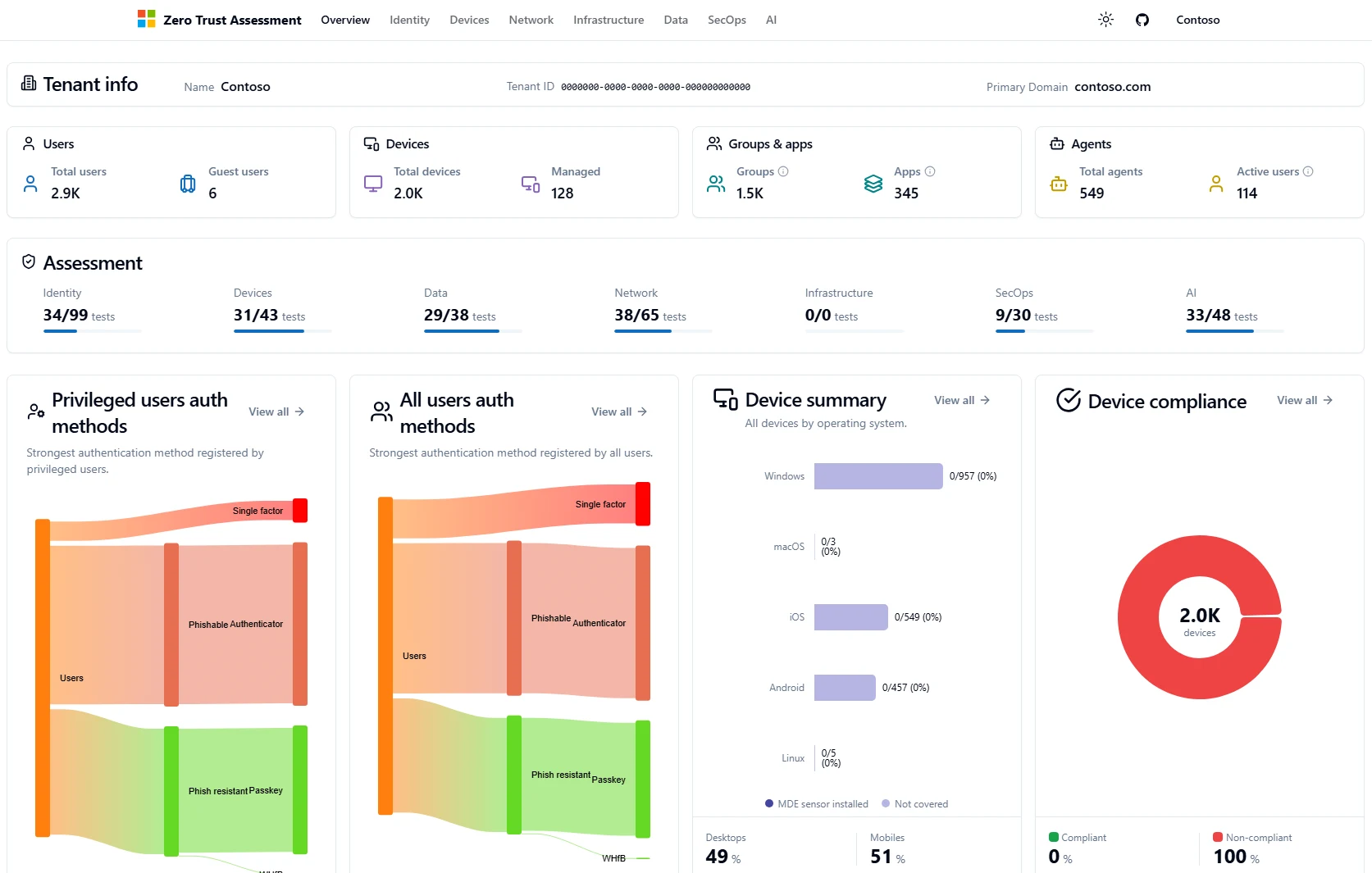
Once complete, the assessment generates an interactive HTML report containing an overview of the environment and detailed findings for each evaluated security pillar.
The results identify individual configuration checks, their associated risk classifications, and whether the assessed configuration meets the expected criteria. Administrators can examine individual findings to understand what was evaluated and review Microsoft’s remediation recommendations.
The detailed results are particularly useful because they allow teams to move beyond a general indication of security posture and investigate specific configurations. A failed check doesn’t necessarily mean that a control is completely absent. It may indicate that the configuration doesn’t satisfy Microsoft’s recommended implementation.
Consider an organization where administrator accounts are protected by MFA but continue to permit SMS authentication. The assessment may identify that phishing-resistant authentication isn’t being enforced. Security teams can then investigate which accounts are affected, determine whether stronger authentication methods are available, and establish a transition plan.
The same principle applies to device compliance. An environment may have thousands of devices enrolled in Intune, but enrollment alone doesn’t establish whether those devices are compliant or whether Conditional Access requires compliance before allowing access to corporate resources.
These distinctions can be overlooked when security teams review products individually rather than examining how their controls operate together.
Supporting reference: Get started with the Zero Trust Assessment ↗
Supporting reference: Microsoft Zero Trust Assessment PowerShell instructions ↗
Prerequisites for running the assessment
Microsoft has made the assessment relatively straightforward to deploy. It doesn’t require endpoint agents or changes to existing security policies, and the assessment itself operates in read-only mode.
PowerShell and operating system
PowerShell 7 is required, together with the Microsoft ZeroTrustAssessment module. Windows is required for full assessment coverage because some underlying Microsoft service modules aren’t supported on other operating systems. Administrators should use a supported Windows environment and follow Microsoft’s current installation instructions.
Supporting reference: Microsoft Zero Trust Assessment PowerShell instructions ↗
Administrative permissions
A Global Administrator must provide the initial consent for the Microsoft Graph permissions requested by the assessment. Microsoft’s published guidance identifies the following roles for subsequent assessments:
- Global Reader
- Security Reader
- Exchange Administrator
- SharePoint Administrator
The exact permissions needed for a particular run can depend on which checks and services are included. Organizations using Privileged Identity Management should plan the required role activations and consent process before starting.
Microsoft Learn lists the four roles above for subsequent runs, while the repository instructions also describe Global Reader support. Review the roles and permissions required by the installed version and selected checks rather than assuming one role supplies complete coverage. Checks that read service principal custom security attributes may also require Attribute Assignment Reader.
Supporting reference: Get started with the Zero Trust Assessment ↗
Supporting reference: Microsoft Zero Trust Assessment PowerShell instructions ↗
Connectivity
The assessment connects to several Microsoft services, including Microsoft Graph, Azure, Exchange Online, SharePoint Online, and Azure Information Protection. Multiple authentication prompts are expected because these services establish separate connections. Some checks require additional service availability or licensing, so not every tenant will produce identical coverage.
Supporting reference: Get started with the Zero Trust Assessment ↗
Supporting reference: Microsoft Zero Trust Assessment PowerShell instructions ↗
Assessment duration and security
Large environments may take more than 24 hours to complete, so the assessment should be scheduled accordingly. Results are generated and stored locally. Although the assessment doesn’t modify tenant security configurations, its output can contain sensitive information, including tenant identifiers, account details, and security configuration findings. Reports should be restricted to authorized personnel.
The current repository instructions also document tenant ID telemetry enabled by default. Review that behavior before running the tool; the -DisableTelemetry switch disables this collection.
Supporting reference: Get started with the Zero Trust Assessment ↗
Supporting reference: Microsoft Zero Trust Assessment PowerShell instructions ↗
Running the assessment
Administrators can install and execute the assessment from PowerShell 7. Install the module:
Install-PSResource -Name ZeroTrustAssessment -Scope CurrentUserConnect to the Microsoft tenant:
Connect-ZtAssessmentRun the assessment:
Invoke-ZtAssessmentThe tool generates an HTML report containing the assessment findings and supporting configuration information. Administrators can also specify a custom report location:
Invoke-ZtAssessment -Path C:\MyAssessment01Microsoft maintains the assessment source code on GitHub, allowing organizations to review the implementation and individual checks before running it.
The installation command above follows the repository’s PSResourceGet instructions. Microsoft Learn also documents Install-Module ZeroTrustAssessment -Scope CurrentUser. Use the installation path appropriate to your PowerShell environment and review the current instructions before execution.
Supporting reference: Get started with the Zero Trust Assessment ↗
Supporting reference: Microsoft Zero Trust Assessment PowerShell instructions ↗
Using the results to prioritize security improvements
An assessment might return dozens or hundreds of findings, depending on the size of the environment and the services in use. Trying to address every failed check simultaneously is rarely practical.
I’d start by examining findings that could expose privileged identities, permit unintended access to organizational information, or undermine controls that the business already believes are enforced.
Take a finding involving phishing-resistant authentication for privileged accounts. The initial technical recommendation might be straightforward, but implementing it requires more than enabling a Conditional Access policy. Security teams need to understand which administrative accounts are affected, whether they support the required authentication methods, and how emergency access and service dependencies are handled.
Similarly, enforcing device compliance through Conditional Access may improve access security, but making the change without examining existing device enrollment and compliance status could interrupt legitimate business operations.
A useful remediation plan should capture the affected control, the associated exposure, the proposed change, the responsible owner, and any dependencies that need to be resolved before implementation. It should distinguish configuration changes that can be addressed immediately from improvements requiring licensing, architectural changes, or coordination between security and IT operations.
Once changes are implemented, repeating the assessment provides an opportunity to validate whether the identified configuration gaps have been addressed.

Where the assessment has limitations
The Zero Trust Assessment evaluates supported Microsoft configuration settings. It doesn’t conduct penetration testing, validate incident response effectiveness, or examine every security dependency within an organization’s infrastructure. Hybrid Active Directory environments, legacy applications, third-party security platforms, and custom integrations may require separate technical reviews.
There is also a difference between having a security control configured and operating that control effectively. A tenant may have appropriate Defender policies enabled, for example, while the organization lacks the resources or processes to investigate and respond to the resulting alerts. The assessment won’t resolve those operational questions.
It also shouldn’t be treated as a formal compliance certification or a definitive security maturity score. Organizations still need to evaluate Microsoft recommendations against regulatory obligations, business requirements, and existing risk management practices.
Getting more from the Microsoft security controls you already own
For organizations already invested in Microsoft’s security ecosystem, the Zero Trust Assessment offers a relatively accessible way to examine whether existing capabilities have been configured consistently.
It can reveal gaps that aren’t immediately apparent when administrators examine individual products, particularly where identity, device, access, and information protection controls depend on one another.
I’d approach the assessment as an opportunity to challenge assumptions about the environment, rather than an exercise in achieving a particular score. Understanding which controls are actually enforced, which findings represent meaningful exposure, and which improvements can realistically be implemented gives security teams a technically grounded set of priorities. In many environments, addressing those priorities may deliver more immediate security improvements than introducing additional products.
Primary source
What is the Zero Trust Assessment? ↗Official Microsoft US English source. Historical announcements describe their original period; consult current documentation before implementation.
Further sources
Get started with the Zero Trust Assessment ↗
Continue reading
Microsoft Zero Trust Assessment vs. CISA SCuBA: Which Should You Run? ↗
CISA SCuBA: An Independent Assessment of Your Microsoft 365 Security Configuration ↗
A modern security operating model for Microsoft environments ↗