 Nex
PRACTITIONER ARTICLE / Security
Your Conditional Access Policies Might Not Protect Your AI Agents
Configure Conditional Access for Microsoft Entra Agent ID, from blueprints and credentials to agent permissions, token testing and policy enforcement.
Published
By Phil Kinsley
By Phil Kinsley
In my Microsoft 365 E3 security baseline, I described the access and device controls I expect organizations to demonstrate. Autonomous agents introduce another question: whose identity is actually requesting access?
An employee can satisfy MFA and device compliance while an agent later requests access using its own identity. The employee's successful sign-in does not demonstrate that the agent's subsequent requests are governed by an appropriate policy.
I see agent access as an extension of that Conditional Access baseline. The same discipline applies: identify the subject, define permitted resources, stage the policy, and demonstrate the intended access decision. We now need to apply that discipline to identities operating without a person signing in.
This guide extends the baseline with a Microsoft Entra Agent ID configuration: blueprint, credentials, agent identity, application permissions, and an agent-specific block policy.
I validated this deployment in my test tenant. The steps below are a reference for administrators reproducing it in their own environments. Confirm licensing, feature availability, and policy behaviour before production enforcement.
Names beginning with Nexlinks-Lab are examples.
1. Understand which identity the policy protects
Three access patterns need different treatment:
| Access pattern | Identity to examine |
|---|---|
| Agent acts on behalf of an employee | The user in the delegated flow |
| Autonomous agent calls an API with application permissions | The agent identity |
| Agent accesses a service through its own agent user account | The agent user account |
This walkthrough uses the second pattern. An agent identity policy does not automatically protect an associated agent user account. Microsoft also documents that policies targeting Users, including all users, do not cover agent user accounts; those require agent-user targeting. Microsoft: Conditional Access for agents.
In a baseline review, I would now ask for evidence of human access controls and autonomous-agent access controls. An inventory should show which access pattern each agent uses, which policy covers it, and who owns exceptions. Requiring MFA for employees remains useful; it does not answer those agent-specific questions.
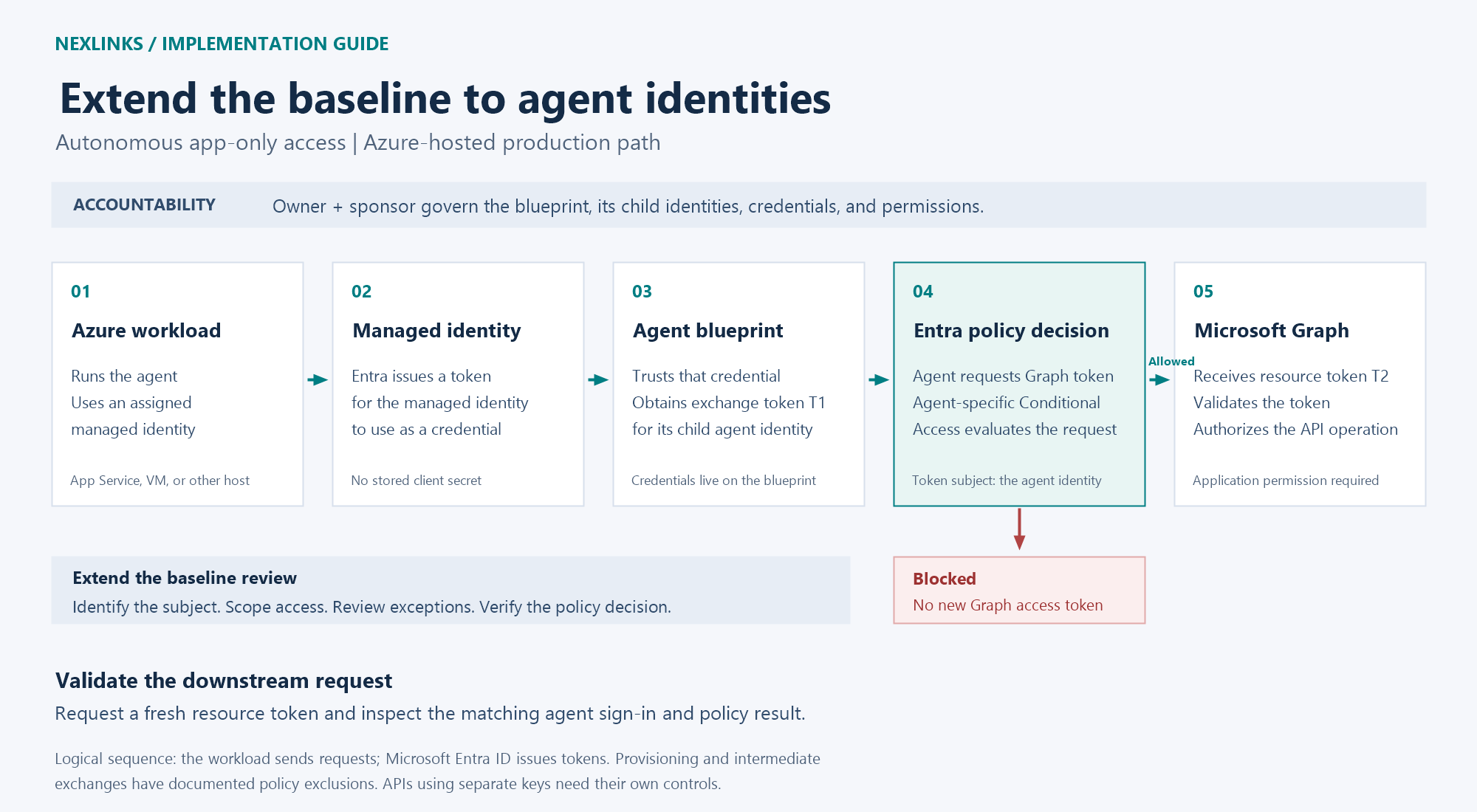
The blueprint supplies the authentication foundation; the child agent identity carries the acting identity and permissions. A managed identity used as a blueprint credential does not replace that child identity. Microsoft: agent service principals.
2. Prepare licensing, roles, and tools
Microsoft currently lists Microsoft 365 E7, or Microsoft Agent 365 paired with at least Entra ID P1 or Microsoft 365 E3, for agent Conditional Access. Agent risk policies require the relevant P2/E5 entitlement alongside Agent 365. An E5 tenant alone does not establish that Agent 365 is licensed. Microsoft: autonomous-agent policy prerequisites.
Prepare the following:
- Agent ID Developer for blueprint creation and federation; Agent ID Administrator for the local secret alternative.
- Privileged Role Administrator for Microsoft Graph application-permission consent, and Conditional Access Administrator for policy configuration.
- Reports Reader for sign-in investigation.
- PowerShell 7, Microsoft Graph PowerShell, and Azure PowerShell for the managed identity path.
- An Azure subscription, existing resource group, and supported host for production federation. Use Managed Identity Contributor to create the identity, plus host-management and identity-assignment permissions to attach it.
Directory roles and Graph scopes are separate requirements. Assign only the roles needed for each administrative task. Microsoft: built-in roles, agent logs, Azure host permissions.
If the modules are not installed, install them for your administrative account:
Install-Module Microsoft.Graph -Scope CurrentUser
Install-Module Az -Scope CurrentUser
3. Create the blueprint and establish accountability
In the Entra admin center:
- Open Entra ID > Agents > Agent blueprints.
- Select New agent blueprint (Preview).
- Name it
Nexlinks-Lab-Blueprint. - Assign an owner to manage configuration and a sponsor accountable for its use.
- Review and create it. The wizard creates the blueprint and its principal.
Record these identifiers separately:
$tenantId = '<TENANT_ID>'
$blueprintAppId = '<BLUEPRINT_APPLICATION_CLIENT_ID>'
$blueprintObjectId = '<BLUEPRINT_APPLICATION_OBJECT_ID>'
The application object ID addresses the blueprint application in the Graph cmdlets below. The client ID is used in OAuth requests and when associating a child agent. The blueprint principal has its own object ID; do not substitute it for either value.
Sponsors are required. Use a user sponsor for this walkthrough. Microsoft: create a blueprint.
4. Configure credentials: production or local development
Azure-hosted production
Microsoft recommends a managed identity federated with the blueprint for production. A local development machine cannot simply use an Azure workload's managed identity endpoint. Microsoft: blueprint credentials.
Create the user-assigned identity in your existing resource group:
Connect-AzAccount -Tenant $tenantId
Set-AzContext -Subscription '<AZURE_SUBSCRIPTION_ID>'
$mi = New-AzUserAssignedIdentity -ResourceGroupName '<RESOURCE_GROUP>' -Name 'nexlinks-lab-agent' -Location '<AZURE_REGION>'
Record its Id, ClientId, and PrincipalId. Microsoft: managed identity PowerShell.
For App Service, open the host's Settings > Identity > User assigned > Add, select this identity, and add it. This operation restarts the app. Configure the workload to select this identity's client ID. Microsoft: attach an identity.
Add the federation relationship:
Connect-MgGraph -TenantId $tenantId -Scopes 'AgentIdentityBlueprint.AddRemoveCreds.All'
$fic = @{
    name = 'nexlinks-lab-managed-identity'
    issuer = "https://login.microsoftonline.com/$tenantId/v2.0"
    subject = $mi.PrincipalId
    audiences = @('api://AzureADTokenExchange')
}
New-MgApplicationFederatedIdentityCredential -ApplicationId $blueprintObjectId -BodyParameter $fic
The subject is the managed identity's principal ID, not its client ID. The issuer, subject, and audience must match the credential token. These cmdlets use the application's object ID. Microsoft: federated credential API, Agent ID credential scope.
For runtime integration, Microsoft recommends its authentication libraries rather than a custom production token implementation. The managed identity token authenticates the blueprint, which obtains tokens for its child agent. Microsoft: autonomous OAuth protocol.
For Microsoft.Identity.Web, the credential configuration is:
{
  "AzureAd": {
    "Instance": "https://login.microsoftonline.com/",
    "TenantId": "<TENANT_ID>",
    "ClientId": "<BLUEPRINT_APPLICATION_CLIENT_ID>",
    "ClientCredentials": [{
      "SourceType": "SignedAssertionFromManagedIdentity",
      "ManagedIdentityClientId": "<MANAGED_IDENTITY_CLIENT_ID>"
    }]
  }
}
Register the agent-identity services and request the downstream token with the child identity, following Microsoft's Microsoft.Identity.Web integration example. The configuration alone does not implement the agent's application logic.
Local development alternative
For the local token demonstration, add a short-lived secret instead:
Connect-MgGraph -TenantId $tenantId -Scopes 'AgentIdentityBlueprint.AddRemoveCreds.All'
$credential = Add-MgApplicationPassword -ApplicationId $blueprintObjectId -PasswordCredential @{
    displayName = 'Nexlinks-Lab-Temporary'
    endDateTime = (Get-Date).ToUniversalTime().AddDays(7)
}
$clientSecret = $credential.SecretText
Keep the value in a protected store if it must survive this session. It is returned only when created. Follow your tenant's credential-lifetime restrictions, and remove it after testing. Microsoft: addPassword.
5. Create the child agent identity
Open Entra ID > Agents > Agent identities > New agent identity (Preview). Select Nexlinks-Lab-Blueprint, name the identity Nexlinks-Lab-DirectoryReader, assign owners and sponsors, and create it. Microsoft: identity creation wizard.
For automation, Microsoft's Graph v1.0 API accepts this request using an appropriately authorized token:
POST https://graph.microsoft.com/v1.0/servicePrincipals/microsoft.graph.agentIdentity
Authorization: Bearer <AUTHORIZED_PROVISIONING_TOKEN>
Content-Type: application/json
OData-Version: 4.0

{
  "displayName": "Nexlinks-Lab-DirectoryReader",
  "agentIdentityBlueprintId": "<BLUEPRINT_APPLICATION_CLIENT_ID>",
  "[email protected]": [
    "https://graph.microsoft.com/v1.0/users/<SPONSOR_USER_OBJECT_ID>"
  ]
}
Delegated provisioning requires AgentIdentity.Create.All and the documented ownership or role authorization. The expected successful response is 201 Created. Record the returned identity id as $agentId; this is the agent identifier used in the following app-only flow. Microsoft: create agentIdentity.
6. Grant the agent its application permission
For a lab directory-read operation, use the Microsoft Graph application permission User.Read.All. This grants broad directory-profile read access; grant it only in an appropriate test tenant and remove it afterward. Production agents should receive permissions justified by their actual task. Microsoft: list users permissions.
Run this as the consent administrator:
$agentId = '<AGENT_IDENTITY_ID>'
Connect-MgGraph -TenantId $tenantId -Scopes 'Application.Read.All','AppRoleAssignment.ReadWrite.All'
$graphSp = Get-MgServicePrincipal -Filter "appId eq '00000003-0000-0000-c000-000000000000'"
$role = @($graphSp.AppRoles | Where-Object {
    $_.Value -eq 'User.Read.All' -and $_.IsEnabled -and $_.AllowedMemberTypes -contains 'Application'
})
if ($role.Count -ne 1) { throw 'Expected one enabled Graph application role.' }
New-MgServicePrincipalAppRoleAssignment -ServicePrincipalId $agentId -PrincipalId $agentId -ResourceId $graphSp.Id -AppRoleId $role[0].Id
Creating the assignment grants the application permission. The two scopes used by the administrative session authorize permission management; they are not permissions to give the agent. The assignment targets the child identity, and resourceId is your tenant's Graph service-principal object ID. Inspect existing assignments before rerunning it. Microsoft: app role assignments.
Some privileged permissions are blocked for agents even with administrator consent. Do not respond to a failed grant by adding unrelated privileges. Microsoft: agent authorization restrictions.
7. Create a narrowly targeted block policy
Start with one test agent:
- Open Entra ID > Conditional Access > Policies > New policy.
- Name it
Nexlinks-Lab-Block-Agent-Graph. - Under Users, agents or workload identities, choose Agents.
- Choose Select agent identities, then select
Nexlinks-Lab-DirectoryReader. - Under Target resources, select Microsoft Graph.
- Under Grant, choose Block.
- Set Enable policy to Report-only, then create it.
Available controls depend on the targeted identity type. Do not copy a human MFA or device-compliance policy into this autonomous app-only scenario. Microsoft: target agent identities.
After validation, a broader design can block all agent identities while excluding approved identities or blueprints. Excluding a blueprint also excludes its future child identities, so blueprint approval needs governance. Microsoft's published allowlist procedure starts in report-only mode. Microsoft: autonomous-agent policies.
8. Validate token issuance, API access, and enforcement
For the local secret path, request a blueprint exchange token and then the agent's Graph token:
$t1 = $null
$t2 = $null
$tokenEndpoint = "https://login.microsoftonline.com/$tenantId/oauth2/v2.0/token"
$t1 = Invoke-RestMethod -Method Post -Uri $tokenEndpoint -ErrorAction Stop -Body @{
    client_id = $blueprintAppId
    scope = 'api://AzureADTokenExchange/.default'
    grant_type = 'client_credentials'
    client_secret = $clientSecret
    fmi_path = $agentId
}
$t2 = Invoke-RestMethod -Method Post -Uri $tokenEndpoint -ErrorAction Stop -Body @{
    client_id = $agentId
    scope = 'https://graph.microsoft.com/.default'
    grant_type = 'client_credentials'
    client_assertion_type = 'urn:ietf:params:oauth:client-assertion-type:jwt-bearer'
    client_assertion = $t1.access_token
}
fmi_path identifies the child agent. The intermediate token is not the Graph access token. In the Azure federation path, the blueprint request uses a managed identity assertion instead of client_secret. Microsoft: autonomous authentication flow.
Use the resulting resource token for a limited read:
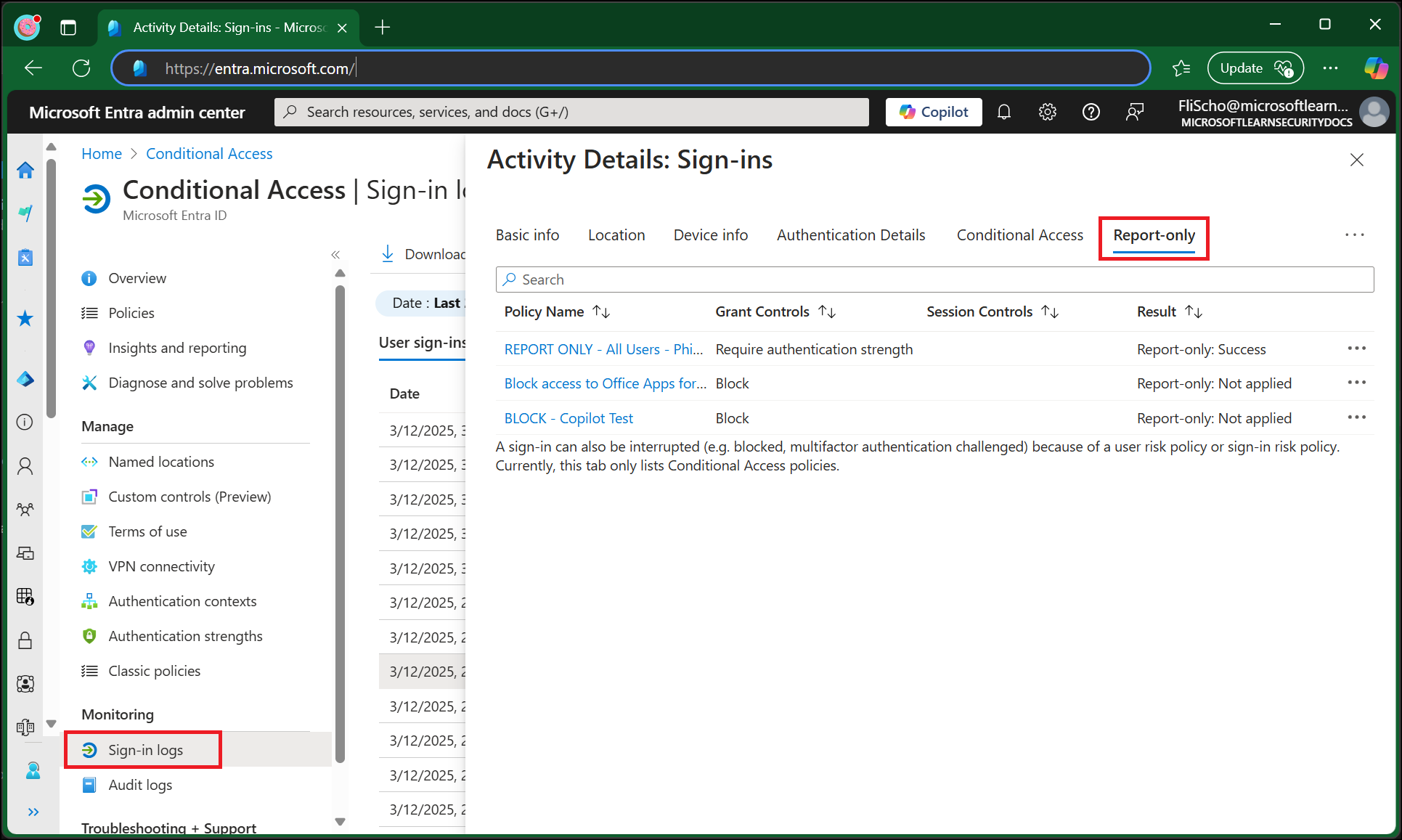
Invoke-RestMethod -Uri 'https://graph.microsoft.com/v1.0/users?$select=id,displayName&$top=1' -Headers @{ Authorization = "Bearer $($t2.access_token)" }In Entra ID > Monitoring & health > Sign-in logs, filter for Agent Identity and inspect the event for this agent and Microsoft Graph. Capture the timestamp, correlation ID, identity, resource, and policy result. Microsoft: agent sign-in logs.
| Observation | Interpretation and next check |
|---|---|
| Report-only failure for the block policy | The evaluated request would be blocked if enforced; no denial has been demonstrated yet. |
| Report-only not applied | Check the identity selection, resource, exclusions, and access pattern. |
| Token request fails after enforcement | Inspect the matching sign-in event and named policy. AADSTS53003 indicates Conditional Access blocking. |
| Token issued, but Graph returns 403 | Investigate permission assignments, token audience, and the requested operation; this alone does not establish a Conditional Access denial. |
Microsoft documents report-only results and Conditional Access error investigation.
Switch only the test policy to On, then repeat both token requests. Compare the resource-token decision with report-only evaluation. Return this test policy to Report-only, request fresh tokens, and repeat the read to confirm recovery. Stop after a token error; do not continue with an old token.
Request fresh tokens during each test. Reusing a previously issued token can obscure the result; Conditional Access is evaluated at token issuance or refresh, with resource-specific continuous evaluation where supported. Blueprint provisioning and intermediate token exchanges have documented policy exclusions. A successful intermediate request therefore does not prove the block failed. Microsoft: evaluation boundaries.
9. Make ownership and cleanup part of the implementation
Keep an inventory linking the host, managed identity, blueprint, child identity, permissions, sponsor, and policy. Review credential changes, consent grants, ownership changes, unexpected sign-ins, and newly created children. Define who can disable an agent and who investigates the resulting business impact. Microsoft: manage agents.
After the lab, disable or remove the test policy, revoke the test app-role assignment, remove the temporary secret, delete the child identity, and retire the blueprint when it has no remaining dependencies. Detach the user-assigned managed identity before deleting it; deleting that identity does not remove host references automatically. Microsoft: identity cleanup.
Conditional Access covers Entra-protected token flows. An agent using an unrelated API key needs separate controls. Identity policy also cannot establish whether an authorized tool call was a sensible decision.
That connects this extension of the Conditional Access baseline to MCP tool poisoning and data governance: govern which tools and data an agent can reach, constrain permitted actions, and assign responsibility for the outcome. The useful evidence is an access decision you can explain and reproduce.
Primary source
Microsoft: Conditional Access for agents ↗Further sources
Microsoft: agent service principals ↗
Microsoft: autonomous-agent policies ↗
Microsoft: agent sign-in logs ↗
Microsoft: attach an identity ↗
Microsoft: federated credential API ↗
Microsoft: autonomous OAuth protocol ↗
Microsoft: autonomous authentication flow ↗
Microsoft: identity creation wizard ↗
Microsoft: create agentIdentity ↗
Microsoft: list users permissions ↗
Microsoft: app role assignments ↗
Microsoft: agent authorization restrictions ↗
Microsoft: target agent identities ↗
Screenshot source: Microsoft Learn ↗
Continue reading
Microsoft 365 E3 Security Baseline: The Access and Device Controls I Expect ↗
You’ve Secured Your AI Agents. But Can You Trust Their MCP Servers? ↗