 Nex
NexPRACTITIONER ARTICLE / Security
How to Deploy Microsoft Defender for Servers: Plan Selection, Onboarding, and Validation
Choose a Defender for Servers plan, onboard Azure and hybrid machines, and verify sensor health, coverage, monitoring, and operating responsibilities.
Published
By Phil Kinsley
Published/Updated October 14, 2026. Publication date is stated in the supplied article. Microsoft screenshots are credited; portal appearance and feature labels may change.
Microsoft source publication: not confirmed
Source reviewed October 14, 2026. Practitioner analysis is editorial interpretation.
By Phil Kinsley
Published/Updated October 14, 2026. Publication date is stated in the supplied article. Microsoft screenshots are credited; portal appearance and feature labels may change.
Microsoft source publication: not confirmed
Source reviewed October 14, 2026. Practitioner analysis is editorial interpretation.
Defender for Servers extends Microsoft Defender for Endpoint protection and Defender for Cloud security assessments to Windows and Linux servers in Azure, on premises, AWS, and Google Cloud. It is easy to enable at subscription level, but that alone is not proof a server is protected. The deployment needs a plan decision, a connection method for non-Azure machines, and a check of sensor health, policy and billing.
1. Choose Plan 1 or Plan 2
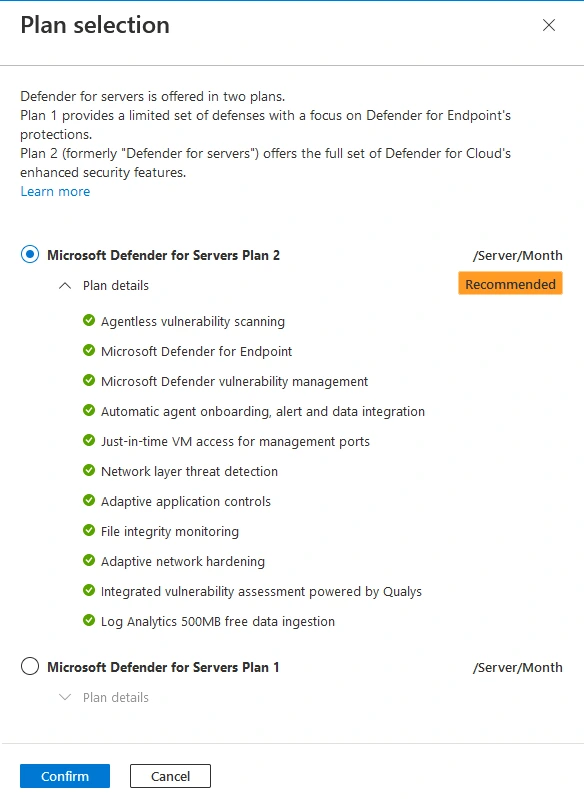
Both plans include Defender for Endpoint integration and core vulnerability assessment. Plan 2 adds posture and monitoring capabilities that are useful when they can be supported and operated.
Start with Plan 1 when endpoint detection and vulnerability visibility are the requirement. Use Plan 2 where there is an operational need for its additional controls. The subscription can default to Plan 2 while specific eligible machines are assigned Plan 1 through supported resource-level configuration. Plan 2 cannot be initially enabled at resource level.
Supporting reference: Choose plan and deployment scope ↗
| Capability | Plan 1 | Plan 2 |
|---|---|---|
| Defender for Endpoint and EDR | Yes | Yes |
| Core vulnerability assessment | Yes | Yes |
| Premium vulnerability management | No | Yes |
| Agentless machine scanning | No | Yes, supported hosts |
| File integrity monitoring | No | Yes, configure separately |
| Just-in-time VM access | No | Yes, supported Azure VMs |
| Eligible Log Analytics ingestion benefit | No | Yes |
2. Check prerequisites
- Confirm Azure subscription and permissions, and the intended resource groups and tenant.
- Inventory operating systems and supported versions, including older Windows Server and Linux distributions.
- Review third-party antivirus or EDR coexistence, existing Defender for Endpoint onboarding and standalone server licenses.
- Allow outbound connections to the Microsoft Defender for Endpoint endpoints and, for hybrid machines, Azure Arc endpoints. Review proxy or private connectivity requirements.
- Choose a small pilot with representative Azure and non-Azure machines before enabling broad subscription coverage.
3. Enable the Defender for Servers plan
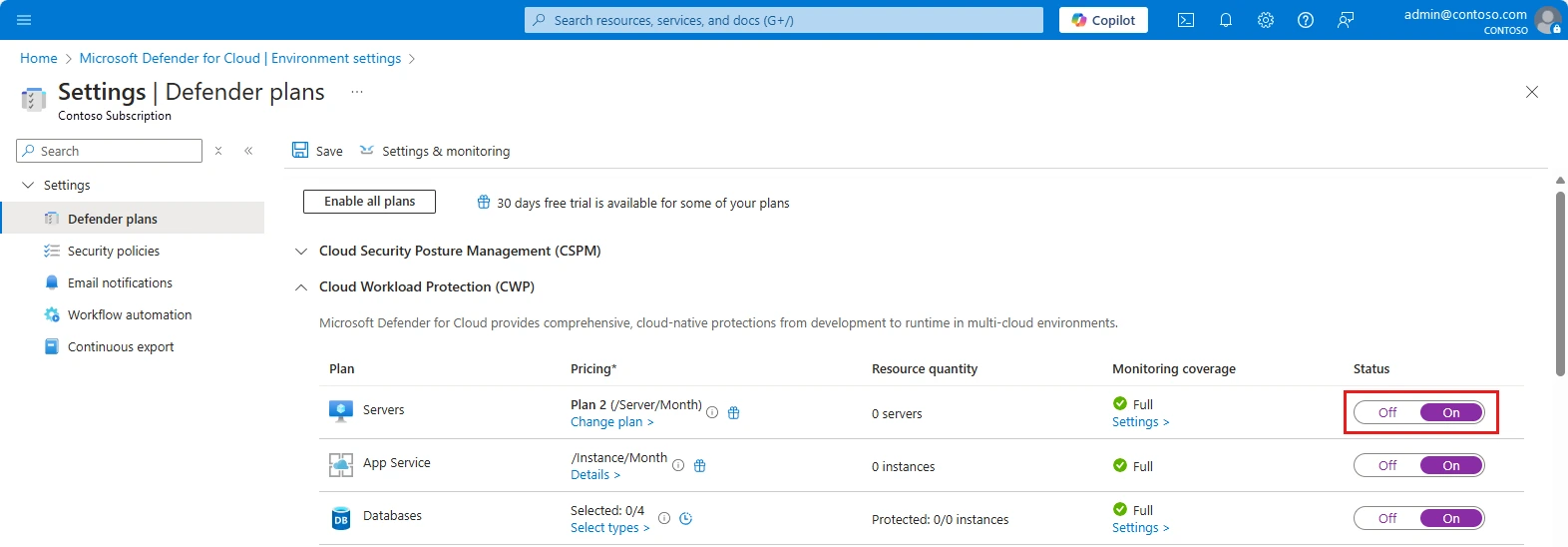
- Open Azure portal > Microsoft Defender for Cloud > Environment settings.
- Select the subscription, AWS account or GCP project.
- On Defender plans, switch Servers to On.
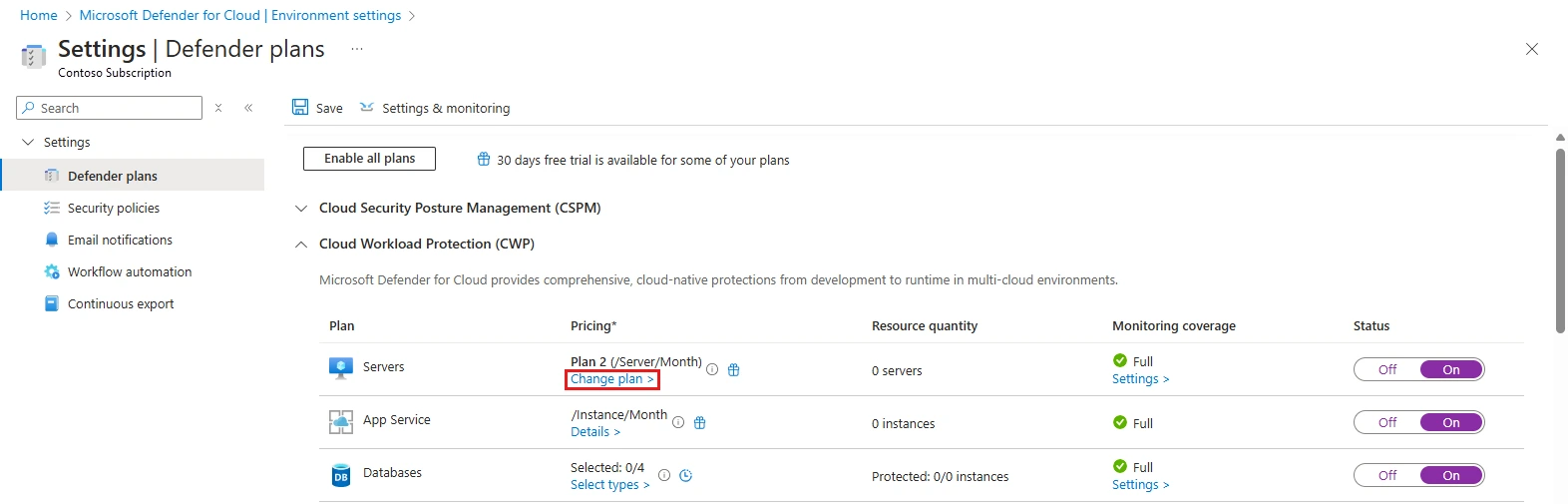
- Select Change plans and choose Plan 1 or Plan 2. New enablement defaults to Plan 2.
- Confirm, then Save. Review machine-level exceptions if a mixed-plan deployment is intended.
The 30-day trial starts when the plan is enabled and cannot be paused or extended. Prepare the pilot first.
Supporting reference: Enable Defender for Servers ↗
4. Review Settings and monitoring
Back in Environment settings, open the Servers plan Settings page. The switches and their defaults are not the same for both plans.
Supporting reference: Settings and monitoring ↗
| Setting | Available in | Typical default |
|---|---|---|
| Endpoint protection | P1 / P2 | On |
| Vulnerability assessment for machines | P1 / P2 | On |
| Agentless scanning for machines | P2 | On |
| File integrity monitoring | P2 | Off |
Endpoint protection
Leave this on to integrate and automatically provision Defender for Endpoint on eligible connected machines. Verify the device actually appears in the Defender portal; a subscription-level setting does not establish sensor health. Review coexistence settings if another antivirus product remains installed.
Supporting reference: Settings and monitoring ↗
Vulnerability assessment
Keep vulnerability assessment enabled and check the configured assessment solution. Review findings in Defender for Cloud recommendations and Defender Vulnerability Management. Plan 2 adds premium vulnerability-management features beyond the standard assessment available with either plan.
Supporting reference: Settings and monitoring ↗
Agentless scanning (Plan 2)
Review the On toggle and Edit configuration for exclusions. This scans supported cloud virtual machines through cloud infrastructure mechanisms. Azure Arc connectivity by itself does not make an on-premises machine eligible for agentless disk scanning. Check encryption, permissions, and hosting support.
Supporting reference: Settings and monitoring ↗
File integrity monitoring (Plan 2)
- Switch File Integrity Monitoring to On.
- Select Edit configuration and specify the required Log Analytics workspace.
- Review recommended file and registry rules; add custom rules only where they support a clear investigation need.
- Check supported Defender for Endpoint sensor versions and Azure Arc connectivity for non-Azure servers.
- Save and validate that expected changes are captured.
FIM is off by default and requires configuration, not simply a Plan 2 license. Start with important configuration paths and avoid monitoring noisy application files indiscriminately.
Supporting reference: Settings and monitoring ↗
5. Onboard non-Azure servers with Azure Arc
Azure Arc Connected Machine agent provides the Azure management connection. It is not the same component as the Defender for Endpoint sensor. Arc is generally the appropriate choice when non-Azure servers need broader Plan 2 functionality.
- Open Azure Arc > Infrastructure > Machines > Onboard/Create > Onboard existing machines.
- Choose subscription, resource group, region and operating system.
- Select public or private endpoint connectivity and configure proxy or Arc Gateway where needed.
- Choose the authentication method, review tags and download the generated script.
- Run OnboardingScript.ps1 in elevated 64-bit Windows PowerShell or OnboardingScript.sh as root on Linux.
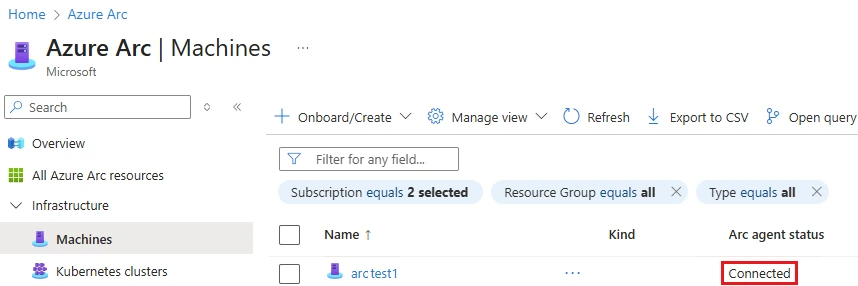
- Return to Azure Arc > Machines, confirm Connected, and validate the expected subscription and resource group.
For larger deployments, use automation and an appropriately scoped Azure Connected Machine Onboarding identity rather than a broadly privileged Owner account. Arc onboarding can also trigger SQL Server discovery and extension deployment, which should be considered during rollout.
Supporting reference: Azure Arc portal onboarding ↗
6. Check Defender for Endpoint enrollment
After Arc registers, allow automatic Defender for Endpoint provisioning on supported hosts. Find the server in Defender for Cloud Inventory, then Microsoft Defender portal > Assets > Devices. Confirm onboarding status, sensor health, recent telemetry and expected security policy. Existing endpoint deployments and third-party AV may need separate attention. Use Microsoft-supported demonstration tests to confirm alert flow.
7. Direct onboarding alternative
Defender for Cloud > Environment settings > Direct onboarding allows supported non-Azure machines already enrolled in Defender for Endpoint to be represented without Arc. This is a useful endpoint-focused option, but the full Plan 2 feature set is not available: direct-onboarded machines receive Plan 1 capabilities and, if Plan 2 is selected, premium Defender Vulnerability Management capabilities. Use Arc where additional hybrid Plan 2 controls are required.
Supporting reference: Direct onboarding with Defender for Endpoint ↗
8. Validate coverage and operating model
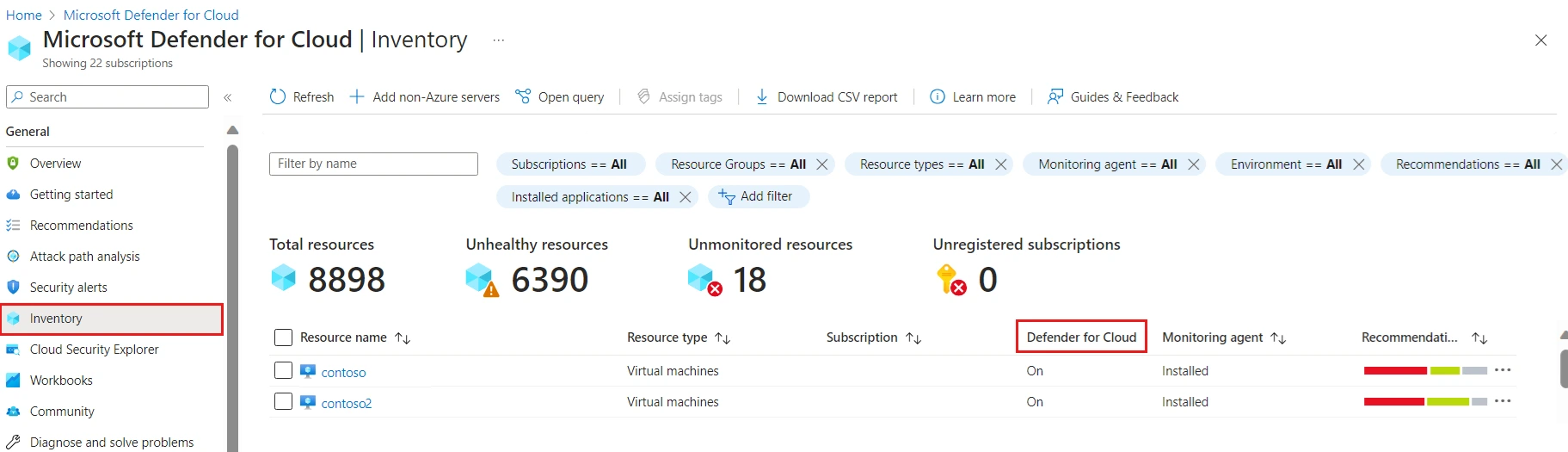
- Match Defender for Cloud inventory to the expected server inventory and check assigned P1/P2 scope.
- Confirm Defender for Endpoint sensor health, vulnerability results, and supported agentless scanning and FIM outputs.
- Verify alerts reach the correct Defender XDR investigation workflow and review any Sentinel integration for duplicate ingestion.
- Assign owners to alert triage, vulnerability remediation, tuning and ongoing agent health checks.
- Review Defender for Cloud Coverage workbook and actual usage charges after the pilot.
9. Representative pricing
Illustrative planning scenario using assumed rates of $5 and $15 per server per month. The live pricing page did not expose numeric rates during this review; these are not independently verified current prices; confirm current pricing in the Azure calculator and customer agreement before procurement. Full-month estimates assume continuously billable servers.
At 100 continuously billable servers, the illustrative annual difference is $12,000. Other charges may arise from Log Analytics, retention or additional Azure services. Plan 2 includes a 500 MB/server/day benefit for eligible Log Analytics security data, subject to configuration and data-type conditions; it is not unlimited ingestion. Check existing Defender for Endpoint for Servers licenses and eligible discounts, plus machine state and Arc billing rules.
Supporting reference: Defender for Cloud pricing ↗
| Plan | 1 server/mo | 25 servers/mo | 100 servers/mo |
|---|---|---|---|
| Plan 1 | $5 | $125 | $500 |
| Plan 2 | $15 | $375 | $1,500 |
Closing perspective
Plan 1 is a reasonable starting point for an organization extending Defender for Endpoint to its server estate. Plan 2 earns its additional cost when the team will actually use the posture and monitoring features, and when the hosting environment supports them. Pilot the configuration, confirm real sensor coverage and alert handling, then use policy and automation to expand. A green onboarding indicator is a starting check, not the end of deployment.
Primary source
Enable Defender for Servers ↗Official Microsoft US English source. Historical announcements describe their original period; consult current documentation before implementation.
Further sources
Choose plan and deployment scope ↗
Continue reading
Deploying Microsoft Defender for Endpoint: Configuration, Validation, and Mistakes to Avoid ↗